Thursday, April 23, 2015

How to Shoot a Star Trails Selfie


How I shot the star trails selfie


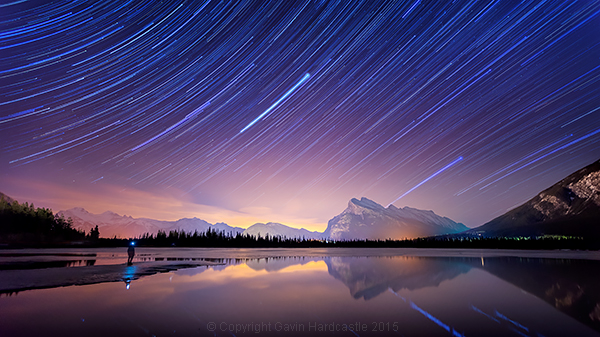
There are times when planning and patience can result in a killer shot. This nighttime star trails selfie (above) that I captured in the Canadian Rockies was one of those times. I'd planned to shoot star trails over Mount Rundle and the town of Banff, Alberta while hopefully capturing reflections in Vermillion Lake, surrounded by melting ice.


My initial vision was for a completely cloudless sky, but the small yet persistent low clouds ended up adding an ethereal quality to the shot I hadn't expected.


When I looked back at my first 30 second exposure, I knew right away that this shot had some potential. All I had to do was set things up properly and then play the waiting game.


I'd like to share with you exactly how I shot and processed this image so that you too can try your hand at star trails, and maybe even a selfie like I did.


Required Gear

  • A digital camera with and intervalometer app
  • A sturdy tripod

Capturing the Shot

Step 1 - Location and conditions


In this case, my location was already set because I wanted Mount Rundle to be central in the composition. I needed a relatively clear night with good visibility of the stars. If it had been cloudy, I would have just stayed home. When planning a location, check the weather forecast and figure out which direction you'll be facing to get an idea of the direction of the star trails. For more info on the movement of the earth and the direction of star trails read this article.


I was shooting the sunset earlier that evening so I had a good idea of how things were going to turn out. Here's the bonus shot I captured while waiting for the stars to arrive.
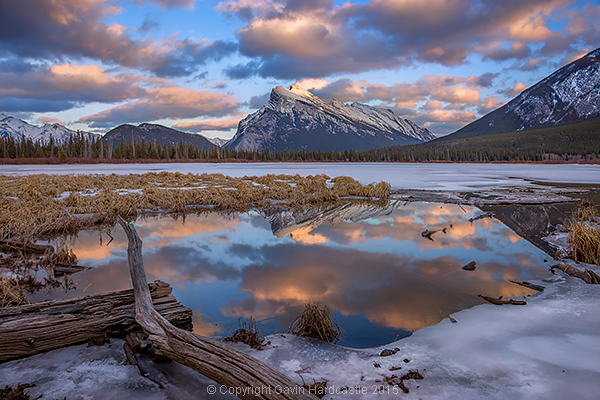


Vermillion Lakes, Banff - Mirror World by Gavin Hardcastle


Step 2 - Composing the shot


Whenever I shoot star trails it's important to remember that I'll need roughly 60-70% of the frame dedicated to a sky that probably isn't doing much. I can't see the star trails until I've finished processing your images and that means I have to imagine the trails and frame the composition accordingly.


Step 3 - Setting aperture, exposure and ISO


Night photography demands that we use much higher ISO settings than we would during daylight hours. It's how we increase the cameras sensitivity to light. With this shot I was able to get away with ISO 2000 because there was a lot of light pollution from the towns of Banff and Canmore.


Using an aperture of f/2.8 meant that my lens was pulling in as much light as it could and with a 30 second exposure. I was happy with the brightness of the image, especially the stars.


Here's one of the RAW frames before processing. Even with the haze and light pollution from Banff I could see that the stars were plenty bright enough to capture trails. You can even see a couple of amorous geese in the shot just in the reflection of Mount Rundle.
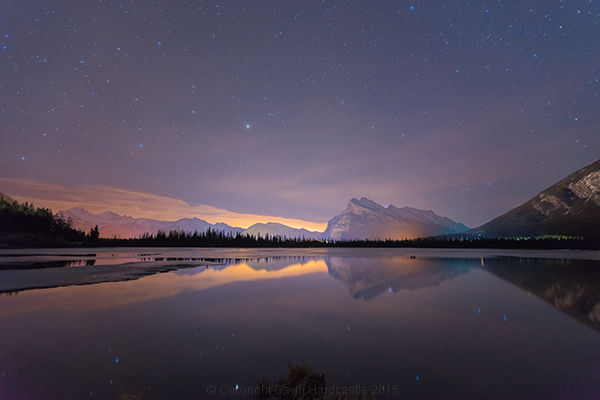


Star Trails RAW frame


Step 4 - Setting up my timelapse intervalometer


I shoot with the Sony A7R camera which has a cool timelapse app. This basically works the same way as a hardware intervalometer which you can get for pretty much any DSLR. It works by taking continuous shots at an interval that I set. I tell the app/intervalometer to take 120 exposures, and that I want them all to be 30 seconds long. I don't want any gap between shots so that means the camera immediately takes one shot after another with no rest period.


When doing this, I make sure to switch off the cameras built-in noise reduction as this can mess up the timing of the intervalometer. In-camera noise reduction can take a long time to process so I don't want my cameras memory buffer locked up and busy when it's supposed to be taking the next exposure.


I'll also want to use the fastest memory card I can afford.
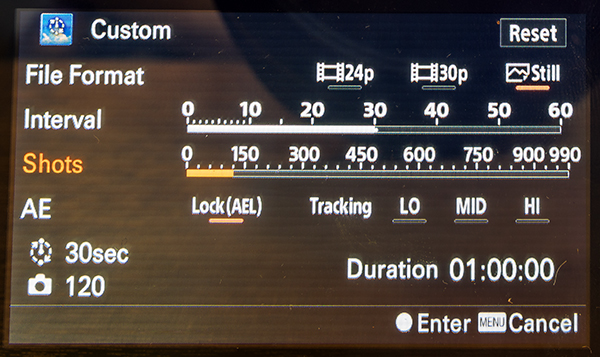

Sony Play Timelapse App


The Sony Timelapse App


Canon DSLR users will be delighted to learn that Magic Lantern has an intervalometer for timelapse shooting.


Step 5 - Final check and off we go


Before I commence shooting a lengthy timelapse I'll do a final check of focus, make sure I've got plenty of battery power left, lots of memory, and that the tripod is stable and not likely to move during shooting. I've learned the hard way that these things can ruin an otherwise perfectly executed timelapse.


Step 6 - Begin shooting and ....... pose


Once you've started your timelapse you've now got to come to terms with your boredom. I didn't plan to do a selfie, I actually wandered into the frame of my shot because I was just looking around at stuff. If you do plan on doing a selfie, just be sure to stand in place long enough for at least one of the exposures to capture you. To be on the safe side, try and stay in position for a full minute.


It might even be really cool if you stand in multiple positions to make it look like a crowd of identical models.
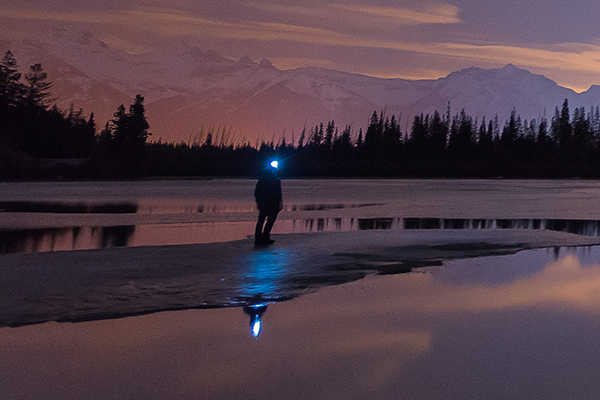


Posing for a selfie in Banff


Top Tip for shooting Star Trails or Timelapse


I highly recommend bringing a second camera so that you can carry on shooting while your A camera is tied up shooting the star trails. Not only does this alleviate crushing boredom, but it's also great practice. You do practice right?


Step 7 - Check your shots before leaving


Once my timelapse has finished, I check the images on the camera before packing up and leaving. I have my camera set to play my images as I spin the jog wheel, kind of like a flip book animation. It's great for checking how the movement of the stars worked out and I'm always amazed at the things the camera picked up that I didn't see. I had lots of frisky geese swimming in and out of my shots as they went about their noisy geese business.


If I spot a disaster in the playback (let's say a bug camped out on my lens) it's time to start all over again. After an hour or so of waiting, I'll be loath to start again, but sometimes you've just got to grin and bear it if you want that killer shot.


Processing the Shots


To process star trail images with this shooting technique, I used Adobe Bridge, Camera RAW and Photoshop.
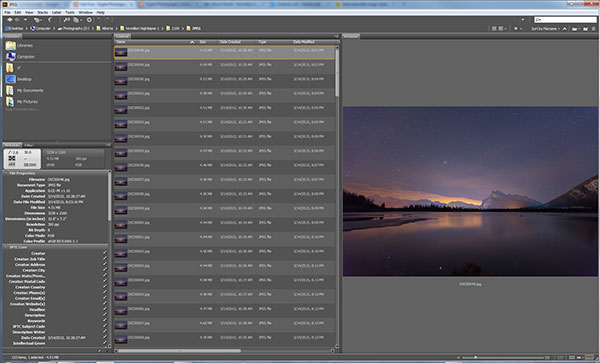

Adobe Bridge lets us quickly preview our star trails timelapse.


Adobe Bridge lets us quickly preview our star trails timelapse. Just hold down the bottom cursor key to flip through all of the frames and watch a rough animation.


Step 1 - Tweak the RAW files


In Adobe Bridge, I'll select all 120 of my images, then right click and choose Open in Camera RAW. This loads the images into Adobe Camera RAW where I can reduce the noise, change the white balance and make any colour tweaks that I want. Here's a list of what I tweaked.


  • Added sharpening
  • Changed White Balance to Auto
  • Added slight noise reduction
  • Increased Contrast
  • Boosted Shadows and Blacks
  • Increased Clarity and Vibrance
  • Reduced Highlights and Whites
  • Used Straighten Tool to fix horizon line

When I'm finished tweaking, I hit Select All, then click Synchronize so that the tweaks I made to my first RAW file get applied to all 120 images. Next I hit the Done button to take me back to Adobe Bridge where I can now see those ACR tweaks applied to all 120 image thumbnails.
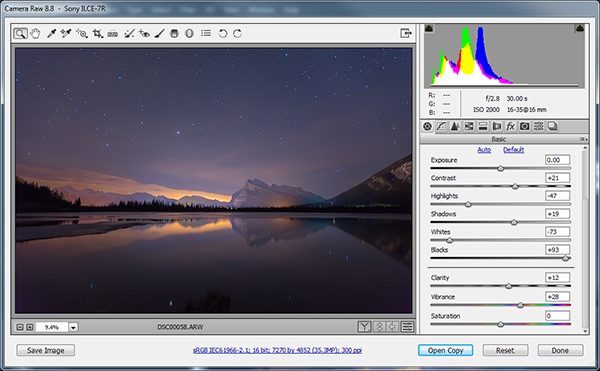

Adobe Camera Raw for processing star trails in Photoshop


I used Adobe Camera to make image corrections and then apply the same corrections to ALL of the frames.


Step 2 - Save as low resolution JPGs


This next step requires a lot of computer resources. My current PC only has 16 GB of RAM so I knew I'd have to make some low resolution versions of my RAW files in order to be able to load all 120 images into Photoshop layers. If I ever print this image, I'll need to reprocess this image at full resolution which will require some major processing, but for web use I know I can get away with using smaller resolution JPEGS to create my final image.


To do this, I select all of my newly tweaked RAW files in Adobe Bridge once again. I then right click and choose Open in Camera RAW. I hit Select All, then choose Save Images in the bottom left. This opens a dialog box where I can specify a location, file format and most importantly, image resolution and size.


I choose JPEG and then specify a resolution of 72 pixels per inch and tell it to resize my images to a much smaller resolution that I know Photoshop can handle but will still look great for web use. Finally I click Save and go make some coffee while I wait for all 120 images to process.
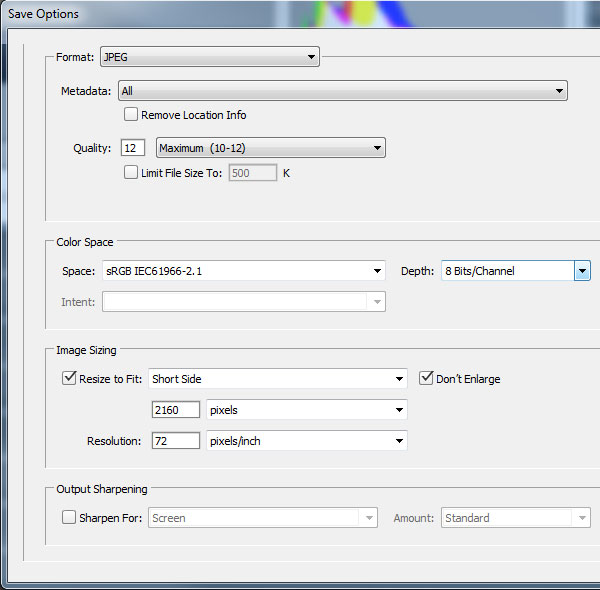


Adobe Camera Raw Save Options


Step 3 - Load the JPEGs into Photoshop layers


Back in Adobe Bridge I navigate to where I saved my low resolution JPEGs. It's best to export these to a separate folder to keep things to tidy. Once again, I select all my JPEGs and then choose Tools > Photoshop > Load Files into Photoshop Layers.


This will take even longer than it took to export the JPEG's so I'll go downstairs and watch an episode of House of Cards.


Step 4 - Can you feel the magic?


This is where the magic happens and I finally get to see my star trails. With all of the 120 images loaded into Photoshop Layers, I go to the Layers panel to select ALL of my layers. This can be done by clicking on the top layer so that it's highlighted in light blue, holding down shift and then clicking on the bottom layer - I need to scroll down to see all 120 layers.


With my 120 layers selected, I now change the Layer Blend Mode to Lighten and BAM - Star Trails!


Note: You could also use a free program like StarStax to put the trails together if you don't have Photoshop.
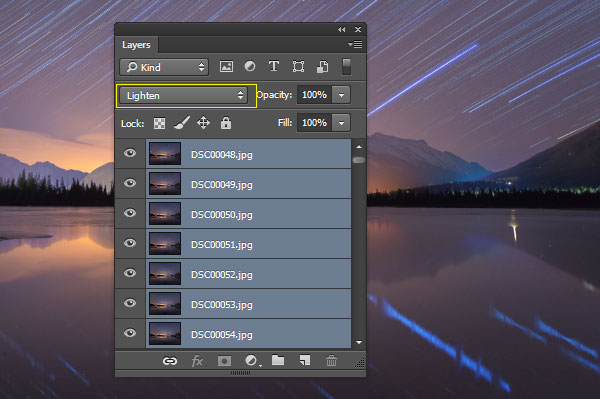


Make Star Trails with the Lighten Blend Mode


From this point on I can process the image with some final tweaks in Photoshop. To do that I'll merge all layers down to one by pressing ctrl+E. Then I can change contrast, colour balance, crop, add a vignette and whatever else I think suites the composition.


My finished star trails selfie is done and ready to share with the world. I hope you like it.


How I shot and Processed a Star Trails Selfie


Why don't you give it a try?


There is a much easier but somewhat less controlled method of getting a shot like this. Follow steps one to three and then simply use a remote shutter release while your camera is set to Bulb mode and take a very long exposure. You could leave the shutter open for an hour or two to capture the same effect. Just be careful that your lens doesn't fog up while the camera heats up.


You won't have the same pinpoint control over each exposure with this simpler method, but it's a great way to get into shooting star trails if you don't have the time to go through all of these post processing steps.


Editor's note: caution - long exposures of this nature will cause your sensor to heat up potentially causing damage to it like stuck pixels or worse. Please do so at your own risk.


If you prefer the more long winded method that I used, you'll get the maximum image quality possible and if you do decide to do some selfie modelling, you can pick the exact exposure that captures you at your best. In my case, it was the back of my head.


The post How to Shoot a Star Trails Selfie by Gavin Hardcastle appeared first on Digital Photography School.

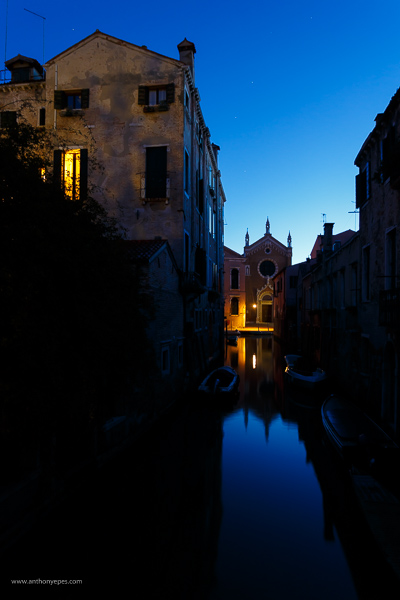
How Your Camera Gets in the Way of Creating Great Photos


I am the kind of person who loves nothing more than to read a new camera manual back to front. When the Canon 5d MK3 came out the manual was over 200 pages, YUM! It was the thickest Canon manual yet, heaven!


Anthonyepesphotography dps2 1


I love my kit and I love finding out how it works, what cool tricks I can do with it and what every single button does plus custom settings, autofocus modes, etc. I still use film (and digital of course), print my own work (which I keep detailed records of) so you can see that I am a solid tech nerd.


Yet, I see all the time how distracting the camera can be when we are taking photos. This statement probably seems like a massive contradiction so let me explain. We expect this piece of kit to take great photos for us - even though the camera is an inert and emotionless device with no brain or heart. Thinking, seeing and feeling are what create great photographs.


Sound technical knowledge is just the springboard - don't get stuck there. Use it to launch your work to the next level by spending the majority of your time improving your ability to see, and I don't mean just taking photos.


Anthonyepesphotography dps2 4


Good technique will only improve the quality of your shots - it will not help you create awesome images, it will not help you tell a story, communicate the feelings of a subject, or show the viewer how a place feels to be standing right there. Only you, the photographer can do that. This is where I think many photographers get a bit lost.
Diane Arbus, one of my favourite photographers, and one of the most revered portrait photographers we've ever had, had a brilliant relationship with her camera:


"I think the camera is something of a nuisance in a way. It's recalcitrant....I mean I can work it fine, although I'm not so great actually. Sometimes when I'm winding it it'll get stuck or something will go wrong and I'll just start clicking everything then suddenly, very often, it's alright again."


For her the camera was just a tool that helped her execute her vision. To create her famous portraits, she spent the most amount of time on finding subjects she was fascinated by, creating a relationship and connecting with them. It's that connection, and the ease at which her subjects felt with her that created the power of her work. The expressions that she obtained from her subjects are often very moving and they tell the story about what it was like to be them.


Once you've learned the fundamentals of how to use your camera, then you are obligated, in my opinion, to focus on seeing, truly looking and truly feeling what's going on in this world. That is how you will create truly unique and original images.


Anthonyepesphotography dps2 2


Seeing is a state of mind


Learning to really see, is learning to be in a state of mind where you notice everything around you. Not just visually, but with every sense, because all of your senses feed into each other. You're wandering around one morning and you smell fresh bread baking; it leads you to the back door of a bakery where the door is propped open and the bakers are laughing as they bake trays of bagels. It's intriguing. It is making you smile.


You are not taking photos. But you are practicing seeing by noticing, by having the intention to notice. All of this is fuel for your photography. It stokes the flames of your creativity, it creates a discipline that you are becoming more and more aware in this world. At first it is a very active practice. It's like becoming a child again. You have to keep paying attention rather than get lost in your thoughts, your to-do list, your future. But the more you do it the more it comes naturally and you start to see the impact that it has on your photography.


Anthonyepesphotography dps2 3


Chase the light


A great way to develop your eye is to always be chasing the light. Light diffracts, reflects, is filtered, and bounces off of things in a myriad of ways. If you see a shadow, think about where is that light coming from. I've spent a lot of my life looking for the sources of reflected light; off building windows, puddles. It's like a light puzzle and when I've found the incident angle, I've solved it, and sometimes get a good shot as a prize.


Return to the same places


We miss most of the things that are happening around us because our brain blocks out what it considers to be unnecessary stimuli. So we are essentially fighting our brain and retraining ourselves to notice. I find going back to a place is a good way to see new things. Ask yourself, "What can I see in this place today that I didn't see yesterday? How can I show something new that I haven't photographed before? How has this new light changed the scene?".


Anthonyepesphotography dps2 5


Create seeing projects for yourself


One fantastic way to start training your eye is to create a seeing project for yourself. Pick a subject, then look for that subject wherever you go. I've done snail-trails; my friend did red-jack playing cards. It could be tabby cats, purple cars, the colour yellow. Lots of people like shooting doors. You get the idea.


Choose something that is not that rare, but rare enough that you'll be challenged, and it will help you to develop your eye. It's like when your mate gets a new car and suddenly you see that car everywhere. The reality is that there aren't more of those cars but your attention has been focused, honed to it. I'm always taking photos of things embedded in the street, purely for my own satisfaction (looking down is as important as looking up!)


Feel


Our senses all work together, and heightening one sense will heighten the others. Having an emotional reaction to your subject will help your photos because you will imbue those feelings in your photos. I loved what travel photographer Steve McCurry said in an interview:


"A picture of a guy in the street in New Guinea, with a bone through his nose is interesting to look at. But for it to be a really good photograph; it has to communicate something about what it is like to live with a bone through your nose. It is a question of the moment to reveal something interesting and profound about the human condition." Steve McCurry


Anthonyepesphotography dps2 6


Shoot the third thing


A few years back Victoria Coren wrote about some advice her father, the late writer Alan Coren, had given. I thought this was a brilliant idea that could be applied to taking photos:


"Don't write the first thought that comes into your head, because that is what everyone will write. And don't write the second thought that comes into your head, because that is what the clever people will write. When you hit on a third thought, pick up the pen. That one is just yours."


That first thought is the photo everyone sees and takes (the tourist shot). The second photo is one you thought over and shot. But the third photo is one where you stopped and really examined everything around you. When you start taking that third shot you will see your style come through. This third way of shooting will come quicker as you practice.


Don't underestimate the power of looking in a different direction


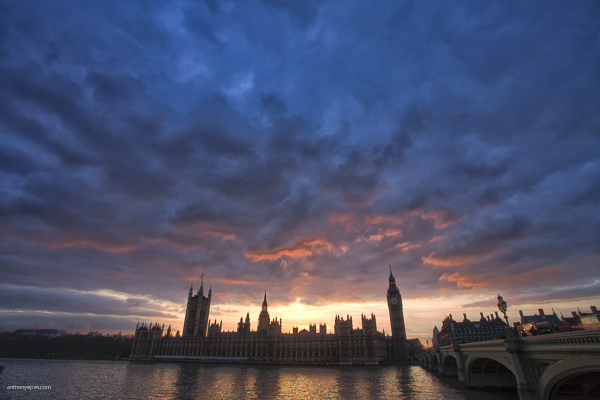
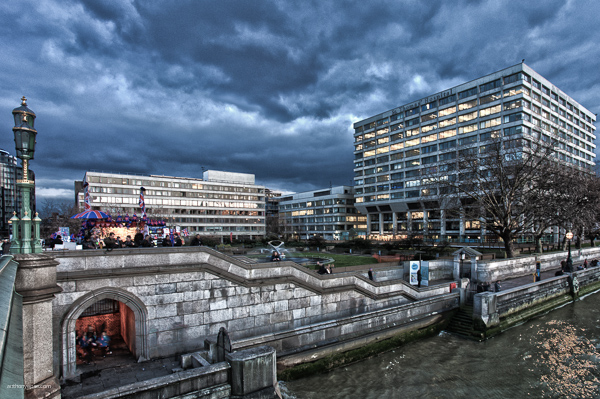
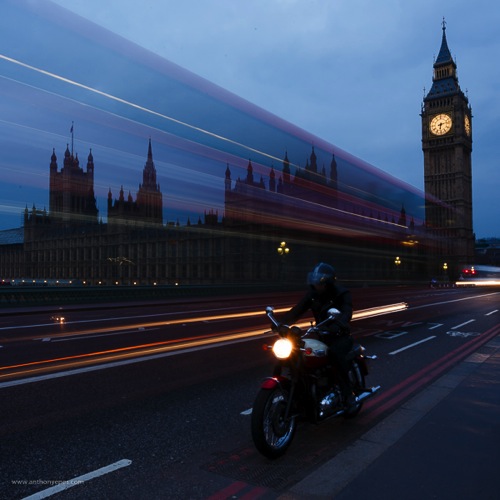
I've found that photographers are often drawn to the same places. I have had so many situations like this one - where I've stood with banks of photographers on Westminster Bridge and they are all shooting in one direction:


Anthonyepesphotography dps2 7


But then, if you turned around, there was a very different style of photo behind us, which everyone was ignoring:


Anthonyepesphotography dps2 8


Seeing is a lifelong journey that will open up tremendous opportunities for your photography. Commit to improving your ability to see, and it will transform your photos. Push yourself always to see more, experience more and feel more.


The post How Your Camera Gets in the Way of Creating Great Photos by Anthony Epes appeared first on Digital Photography School.

Wednesday, April 22, 2015

Learning Canon’s Flash System


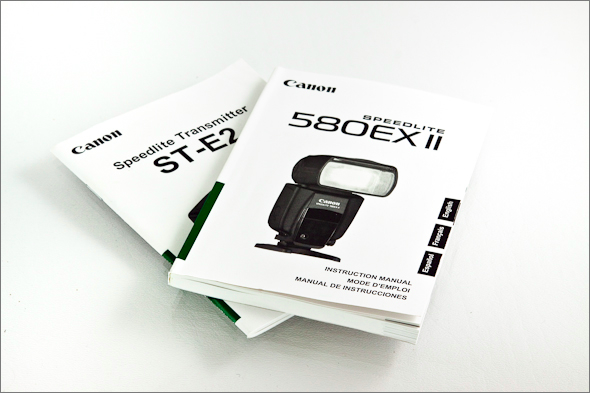
I need to get this one out of the way before we begin. When you bought your Canon 580EX II Speedlite (or any other Canon Speedlite for that matter) it came with this beautiful little 57 page manual written in English, French and Spanish. I suspect it was originally written by a little old Japanese lady and translated into these three languages which goes a long way to explaining why its mostly incomprehensible to photographers. Its that left brain, right brain thing.


Never the less, you really should start your journey to Speedlite nirvana by reading the manual for each flash you plan on using. You never know. You might even learn how to say "Auto FP High Speed Sync" without it sounding like "Auto Frak'ng Hay Seed Stink".


Read the Manuals


Read the Manuals
Copyright 2009 Jeff Lynch Photography
Shot taken with a Canon EOS 50D set on aperture priority (Av) using an EF 24-105mm f/4L IS USM tripod mounted. The exposure was taken at 70mm, f/11 for 6 seconds at ISO 100 on Lexar Professional digital film. The lighting setup was fairly simple. One off-camera 580EX II Speedlite shot through a softbox with a small reflector adding fill light. All exposure magic was done wirelessly using Canon's E-TTL II sorcery. Post capture processing was done in Lightroom 2 using Nik Software's Color Efex Pro filters. Click on the image above for a larger version.


By the way. Once you're done reading these little gems, you really should take a peek at my four favorite books on using small strobes.


  • The Hot Shoe Diaries: Big Light from Small Flashes by Joe McNally
  • The Moment It Clicks: Photography secrets from one of the world's top shooters by Joe McNally
  • Minimalist Lighting: Professional Techniques for Location Photography by Kirk Tuck
  • Minimalist Lighting: Professional Techniques for Studio Photography by Kirk Tuck

Posted in Photography Tagged: Canon, Canon 50D, Canon 580EX II Speedlite, Product Photography


Tuesday Morning Quickie – Moose McNally


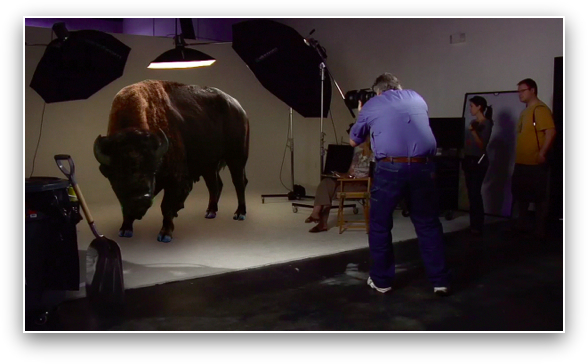
I said this once before but now I'm really convinced that Moose Peterson has been spending way too much time with Joe McNally on those DLWS outings. All kidding aside, if you're not a member of NAPP and haven't signed up for any of the online courses at Kelby Training you really don't know what your missing.


Moose McNally


There are dozens of top notch video training classes from folks like Moose Peterson, Joe McNally, Matt Kloskowski, Laurie Excell, Dave Cross, Cory Barker, Rick Sammon (finally, a Canon shooter), Terry White, RC and even Scott Kelby. If you want to learn from the best, this is the one place where they all come together and for less than $200 for a year of unlimited training sessions, its a steal. NAPP members even get a special discount!


Tell them Jeff sent you. They won't have a clue what you're talking about but its worth a laugh or two. Speaking of laughs, did you notice the shovel and large garbage can in the left of the photo? I've never seen those two accessories on Adorama's web site.


Posted in Photography Tagged: Joe McNally, Kelby Training, Moose Peterson, NAPP